
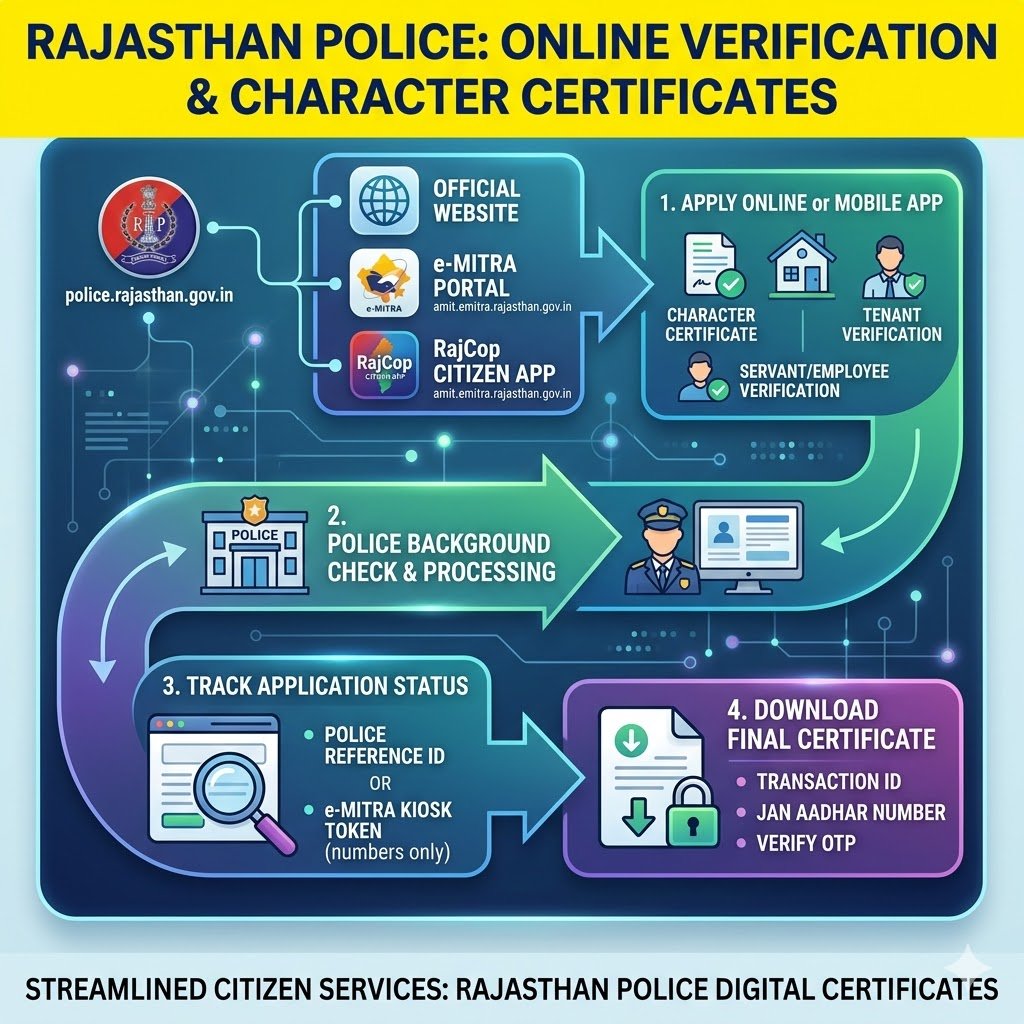
The Rajasthan Police has streamlined the process for citizens to obtain their Police Verification and Character Certificates. Whether it is for a new job, a visa application, or verifying a tenant or domestic worker, the entire process is digitized to reduce the need for physical station visits.
Here is a comprehensive breakdown of the official websites, application processes, and methods for tracking and downloading your certificate.
Official Platforms for Verification
Citizens can access verification services through several official government channels:
- Rajasthan Police Official Website: Users can access various citizen services directly via the portal at police.rajasthan.gov.in.
- e-Mitra Portal: The centralized Rajasthan e-Mitra portal (emitra.rajasthan.gov.in) handles application submissions, transaction tracking, and certificate downloads.
- RajCop Citizen App: Available on the Google Play Store, this mobile application allows users to request and manage verifications directly from their smartphones.
How to Apply Online
The Rajasthan Police offers multiple verification services tailored to different needs, including “Servant/ Employee Verification,” “Tenant/ PG Verification Request,” and the standard “Character Verification Request”.
- Applicants can submit their requests and pay any required service charges through the state’s online e-Mitra platform.
- Alternatively, mobile users can utilize the RajCop Citizen App, which provides a dedicated feature to simplify the process of tenant and servant verification.
Checking Your Application Status
Once an application is submitted, applicants can easily track its progress online.
- The Rajasthan Police provides a dedicated “Character Uploads Status” page on their website.
- Applicants can search for their application status using specific search criteria.
- The required credentials to check the status are either a “Police Reference Id” or an “Emitra Kiosk Token” (inputting numbers only).
- The e-Mitra portal also features an “Online verification / Transaction Status” tool from its homepage.
Downloading the Character Certificate
After the background check is completed by the police authorities, the finalized certificate is made available for digital download.
- Users can navigate to the “Download Certificates” section on the e-Mitra portal to begin the retrieval process.
- To access the Police Character Certificate, applicants must select the certificate type and enter both their “Transaction ID” and “Jan Aadhar Number”.
- For security purposes, an OTP (One-Time Password) is sent to the mobile number of the Head of the Family (HOF) linked to the Jan Aadhar account.
- The certificate is successfully generated and ready for download only after the OTP is verified on the portal.
The RajCop Citizen App
For residents seeking efficient, digital police services, the RajCop Citizen App is highly recommended.
- Beyond simple verifications, the app features emergency help through the RajCop SOS function.
- Users can register new complaints, check their current status, and view or download filed FIRs (excluding those restricted by law, such as sexual offences).
- The application supports both English and Hindi languages to ensure wider accessibility for all residents.